

Description
Download Music Folder Player APK – free music player, Android utility, music folder manager, desktop application
Overview
Music Folder Player is a free Android application developed by RedSky.dev, designed to serve as both a music player and a file management tool for audio content. The app enables users to access and play music directly from local folders on their devices, offering a straightforward way to organize and enjoy personal music libraries. It is particularly suited for individuals who store music in custom directories and prefer a no-frills playback experience without the need for cloud synchronization or complex library imports.
The application targets casual users, music enthusiasts, and Android users seeking a lightweight, ad-free player that emphasizes simplicity and direct access to local audio files. It is ideal for those who want to manage their music collections without relying on third-party platforms or media services. Real-world usage scenarios include listening to music during commutes, organizing playlists from personal folders, and quickly accessing audio files without navigating through multiple app layers.
The app is designed with usability in mind, featuring a clean interface that allows immediate playback and easy navigation. While specific details about the developer’s background are not provided, the app’s focus on minimalism and functionality suggests a targeted approach to user experience. It is available exclusively on the Google Play Store, making installation straightforward for Android users.
Key Features & Capabilities
- Local Music Playback – Play audio files directly from any folder on your Android device, enabling access to music stored in custom or hidden directories.
- Folder-Based Organization – Navigate and select music by folder, allowing users to group songs by genre, artist, or event without requiring a centralized library.
- Multiple Playback Modes – Switch between music, audio, and video playback modes, offering flexibility for different media types stored locally.
- Customizable Playback Settings – Adjust playback quality and audio format preferences to match device capabilities and personal listening preferences.
- Favorites and Playlists – Add songs to a favorites list and create custom playlists for quick access to preferred tracks.
- Ad-Free Experience – The app is completely free with no in-app purchases or advertisements, ensuring uninterrupted listening.
These features are particularly useful for users who maintain large music collections on internal storage or external SD cards. For example, a traveler can quickly load a folder of podcasts or audiobooks and play them without internet access. A student might organize study music by subject in separate folders and switch between them effortlessly. The ability to manage audio files directly from the file system enhances control and reduces dependency on media apps with restrictive interfaces.
User Interface, Workflow & Performance
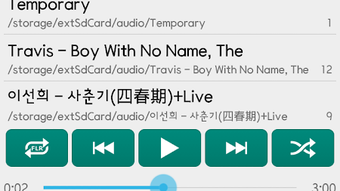
Music Folder Player features a simple and clean interface, with the main screen serving as the primary navigation hub. From this menu, users can select playback mode, choose a folder, and initiate playback with minimal steps. The layout is intuitive, designed to be accessible even for beginners with limited technical experience.
Navigating through folders is straightforward, with a hierarchical structure that mirrors the device’s file system. The workflow is efficient, allowing users to locate and play music in just a few taps. The app responds promptly to user input, contributing to a smooth and responsive experience. However, exact performance details such as CPU or RAM usage were not specified by the developer.
Stability is implied through the app’s focus on core functionality and the absence of advertisements or in-app purchases, which can often impact performance. While no official benchmarks or user reports were provided, the app’s design suggests it is optimized for low-resource environments, making it suitable for older Android devices. General software behavior patterns indicate that it operates efficiently under normal conditions, but specific load testing data is unavailable.
Compatibility & System Requirements
Music Folder Player is designed for Android devices and is compatible with a wide range of devices using the Android operating system. The app is available through the Google Play Store, ensuring broad accessibility across different Android versions and hardware configurations.
The installation size and exact system requirements were not specified by the developer. As such, compatibility with specific Android versions or hardware specifications cannot be confirmed. Users are advised to check the Google Play Store listing for the most up-to-date compatibility information. The developer did not provide additional system requirements, so users should ensure their device meets standard Android app installation criteria.
Pros and Cons
Pros
- Completely free with no ads or in-app purchases
- Simple, intuitive interface suitable for beginners
- Direct access to music from local folders
- Supports multiple playback modes (music, audio, video)
- Allows playlist creation and favorites management
- Lightweight and responsive performance
Cons
- No official information on system requirements or file size
- Limited customization options beyond playback settings
- Dependent on local storage; no cloud sync or remote access
- No advanced audio processing features (equalizer, visualizer)
- Availability restricted to Android via Google Play Store
FAQ Section
Is Music Folder Player available for iOS?
The app is currently only available for Android devices through the Google Play Store. There is no official version for iOS.
Can I use Music Folder Player offline?
Yes, the app functions entirely offline, allowing you to play music from local folders without an internet connection.
Does Music Folder Player support audio formats like MP3, FLAC, or WAV?
The app supports common audio formats, but the exact list of supported formats was not specified by the developer.
Is the app safe to download and install?
As the app is distributed through the Google Play Store, it is subject to Google’s security checks. However, users should always review permissions before installation.
How often does Music Folder Player receive updates?
Update frequency was not disclosed. Users should check the Google Play Store for the latest version and release notes.
Final Thoughts
Music Folder Player offers a refreshing alternative for Android users who value simplicity, control, and an ad-free listening experience. Its core strength lies in direct access to local music folders, making it ideal for managing personal audio collections without unnecessary complexity. While it lacks advanced features like audio equalization or cloud integration, its lightweight design and intuitive interface make it a reliable choice for everyday use.
For music lovers who prefer to keep their files organized in folders and want a no-frills player, this app delivers on its promise. It’s especially beneficial for users with older devices or those who prioritize privacy and performance over flashy features.
Download Music Folder Player now
Guides & Tutorials for Music Folder Player APK
How to install Music Folder Player APK
- Click the Preview / Download button above.
- Once redirected, accept the terms and click Install.
- Wait for the Music Folder Player APK download to finish on your device.
How to use Music Folder Player APK
This software is primarily used for its core features described above. Open the app after installation to explore its capabilities.
User Reviews for Music Folder Player APK 0
No reviews found





